Outliner Collapse Tools
A downloadable Blender Addon
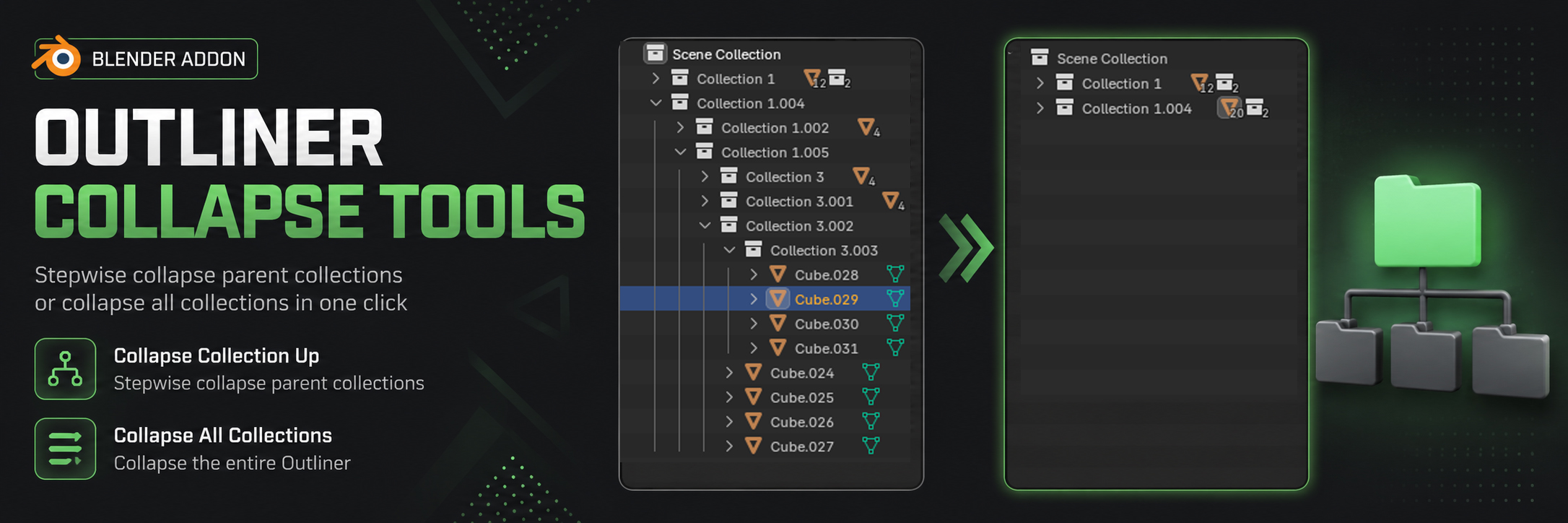
Outliner Collapse Tools is a small yet powerful Blender addon that adds two intelligent collection collapsing functions to the outliner. It is designed for artists working with complex scenes that have deep object hierarchies, helping you navigate faster without wasting time on manual clicking.
The addon provides two main actions:
1. Stepwise Collapse Hierarchy (Collapse Collection Up). This function lets you step up from the active object through its parent collections, collapsing each one in sequence. Simply select an object in the outliner or the 3D viewport, press the hotkey, and the addon will automatically find the object's parent collection and collapse it. Press the key again to move one level higher and collapse the next parent collection, continuing all the way to the root.
2. Collapse All Collections. With one press, you can collapse every single collection in the outliner. This instantly transforms even the messiest list into a tidy, compact view, showing only the top-level items. Great for quickly resetting the outliner state before starting new work or searching for something specific.
Important
Both actions are performed exclusively via hotkeys and work only when the outliner area is active. The addon does not add any buttons or menus to the interface — everything is controlled through the keyboard, keeping your workflow fast and distraction-free. Hotkeys can be easily reassigned to any other keys in the addon preferences (Preferences → Add-ons → Outliner Collapse Tools).
━━━━━━━━━━━━━━━━━━━━━━━━━━━━━━━━
Outliner Collapse Tools — это небольшое, но мощное дополнение для Blender, которое добавляет в аутлайнер две интеллектуальные функции сворачивания коллекций. Оно создано для тех, кто работает со сложными сценами с глубокой иерархией объектов и хочет быстрой навигации, не теряя время на ручные клики.
Аддон предлагает два основных действия:
1. Пошаговое сворачивание иерархии (Collapse Collection Up). Эта функция позволяет последовательно подниматься от активного объекта вверх по цепочке родительских коллекций, сворачивая каждую из них. Вы просто выбираете объект в аутлайнере или в 3D-вьюпорте, нажимаете горячую клавишу, и аддон автоматически находит коллекцию, содержащую объект, сворачивает её, затем при повторном нажатии переходит на уровень выше и сворачивает следующую родительскую коллекцию, и так до самого корня.
2. Сворачивание всех коллекций (Collapse All Collections). Одним нажатием вы сворачиваете абсолютно все коллекции в аутлайнере. Это моментально превращает даже самый захламлённый список в аккуратный компактный вид, оставляя видны только корневые элементы. Отлично подходит для быстрого «сброса» состояния аутлайнера перед началом новой работы или поиска.
Важно
Оба действия выполняются исключительно с помощью горячих клавиш и работают только когда активна область аутлайнера. В интерфейсе аддона нет кнопок или меню — всё управление происходит через клавиатуру, что делает работу максимально быстрой и не отвлекающей от творческого процесса. Горячие клавиши можно легко переназначить на любые другие в настройках аддона
Download
Install instructions
- Download .py the file.
- In Blender, go to Edit → Preferences → Add-ons → Install… and select the downloaded file.
- Enable the add-on.
- Change the keyboard shortcut as desired.
- Enjoy!
━━━━━━━━━━━━━━━━━━━━━━━━━━━━━━━━
- Скачайте .py файл.
- В Blender перейдите в Edit → Preferences → Add-ons → Install… и выберите скачанный файл.
- Включите аддон.
- По желанию измените сочетание клавиш.
- Наслаждайтесь!
Leave a comment
Log in with itch.io to leave a comment.